Dates
Save expiry dates, production dates, missing dates, and reminder timing so date review becomes a focused list.
Food expiration tracker app guide
ItemLog helps you keep practical records for pantry food, fridge items, freezer stock, and other household supplies. Save dates, quantities, and storage locations, review editable photo-assisted results, and use local reminders as prompts to check items later.
ItemLog is a record and reminder utility. It does not decide whether food is safe to eat or use.
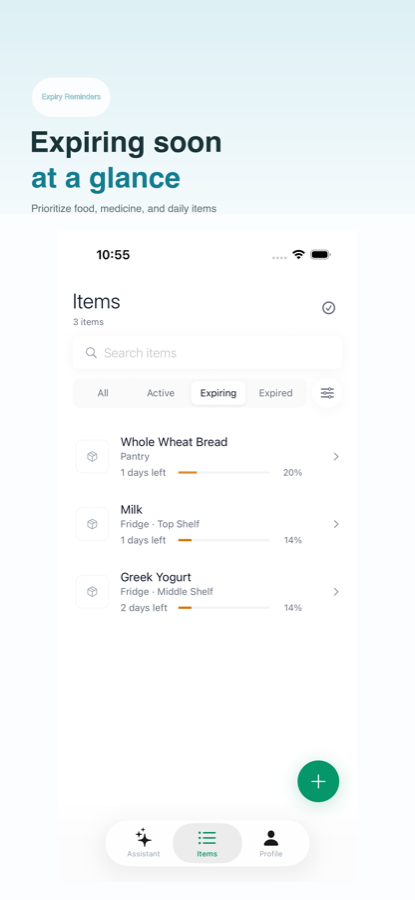
Food expiration tracking breaks down when dates live in scattered notes, receipts, photos, and memory. ItemLog keeps the record short enough to update while unpacking groceries or reviewing a shelf.
Save expiry dates, production dates, missing dates, and reminder timing so date review becomes a focused list.
Separate pantry shelves, fridge drawers, freezer bins, and cabinets so an item can be found later.
Record counts, packages, notes, and purchase details when they help reduce duplicate buying.
A food expiration tracker should be fast on a phone. ItemLog keeps the flow centered on the fields that matter for repeated household checks.
Add an item from a package photo, receipt, text note, or voice input.
Check the recognized name, date, quantity, location, price, note, and reminder before saving.
Keep the record in a searchable inventory list for pantry, fridge, freezer, and household supplies.
Use local reminders and expiry views as prompts to inspect items physically.
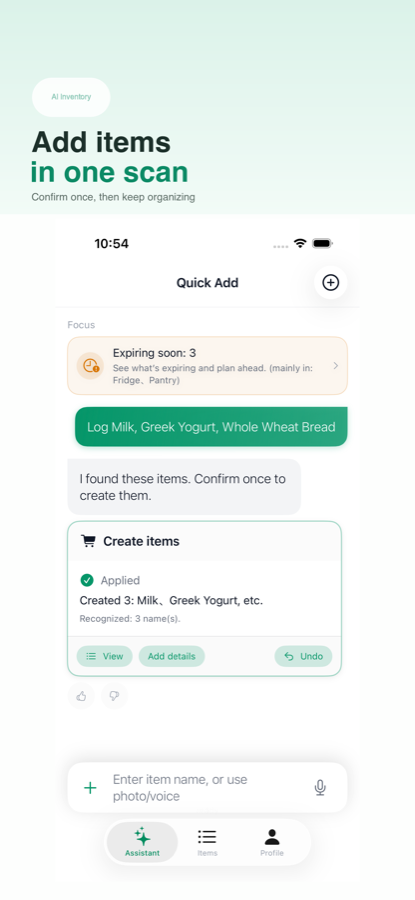
Any system can track a date once. The harder part is keeping the list usable after several grocery trips, freezer resets, and half-used packages.
| Need | Notes | Calendar alerts | Spreadsheet | ItemLog |
|---|---|---|---|---|
| Fast package capture | Manual text | Manual event | Manual typing | Photo, text, or voice |
| Storage locations | Loose sections | Not built for inventory | Custom columns | Structured locations |
| Missing-date review | Hard to filter | Not visible | Possible with upkeep | Dedicated item fields |
| Mobile upkeep | Fast but messy | Simple but fragmented | Flexible but heavy | Focused expiry workflow |
An expiration tracker can help you notice forgotten records, but the final decision should come from the package label, storage conditions, manufacturer instructions, and appropriate guidance. ItemLog does not provide food safety, nutrition, medical, baby product, or allergen advice.
If a date is blurry or missing, leave it blank or mark the record for later review instead of guessing.
Recognition can be wrong. Treat photo-assisted entry as a faster starting point, then correct fields before saving.
Track only fields that help future decisions: date, quantity, location, and notes that you will actually use.
Start with the areas where forgotten dates are most common. A small useful list is better than a large inventory that becomes too much work.
Track sauces, canned food, dry goods, snacks, baking supplies, and backups that can sit for months.
Save leftovers, frozen packages, opened products, and bulk purchases with location notes.
Use the same reminder structure for medicine cabinet records and personal care products, while following labels and professional guidance.
A food expiration tracker app helps you record dates, quantities, storage locations, and reminders for food items so you can review what needs attention. It is a record and reminder tool, not a food safety decision maker.
Yes. ItemLog can track pantry shelves, fridge items, freezer items, medicine cabinet records, personal care products, and household supplies with dates, quantities, and locations.
Yes. ItemLog supports photo-assisted entry, text, and voice input. AI-assisted results remain editable, so you should review names, dates, quantities, and reminders before saving.
No. ItemLog organizes personal records and reminders. Food safety decisions should follow package labels, storage conditions, manufacturer instructions, and appropriate professional guidance.
Useful fields include quantity, storage location, production date, purchase note, price, reminder timing, and whether the date was missing or unclear.
ItemLog is designed for repeated mobile capture, review, save, and reminder tasks. A spreadsheet can still work for custom analysis, but it often takes more upkeep on a phone.